
An Expert Advisor, or EA, is a program that follows predefined trading rules on a compatible platform. Depending on its design and permissions, it can analyse market conditions, generate signals, place or manage trades, and keep monitoring the market, but it still depends on its strategy, technical setup, and human oversight.
What Is an Expert Advisor?
An Expert Advisor is a type of program commonly associated with the MetaTrader platform ecosystem. It applies programmed logic to incoming market information. Some EAs only alert the trader when specified conditions appear, while others can submit, modify, or close orders when automated trading is enabled.
The terms used around this technology overlap, but they are not exact synonyms:
| Term | Practical meaning |
|---|---|
| Expert Advisor (EA) | A program, usually associated with MetaTrader, that can analyse markets and perform programmed trading tasks. |
| Automated trading | The broader category of systems that automate some or all analysis, order, or trade-management actions. |
| Algorithmic trading | A broad technical term for trading decisions or actions driven by formal rules or algorithms. |
| Trading bot | An informal term for automated trading software; it is not necessarily a MetaTrader program. |
EA trading is therefore one form of automated and algorithmic trading. The term “Forex EA” often describes an EA designed to work with currency-pair data, but the program’s actual instruments and functions depend on its code and the platform, account, and broker environment in which it runs.
How Does an EA Work?
An EA receives market information from its trading platform and evaluates it against programmed conditions. If those conditions are met, the program may create a signal or send a permitted order instruction. It then continues checking the market and any open positions according to its rules.
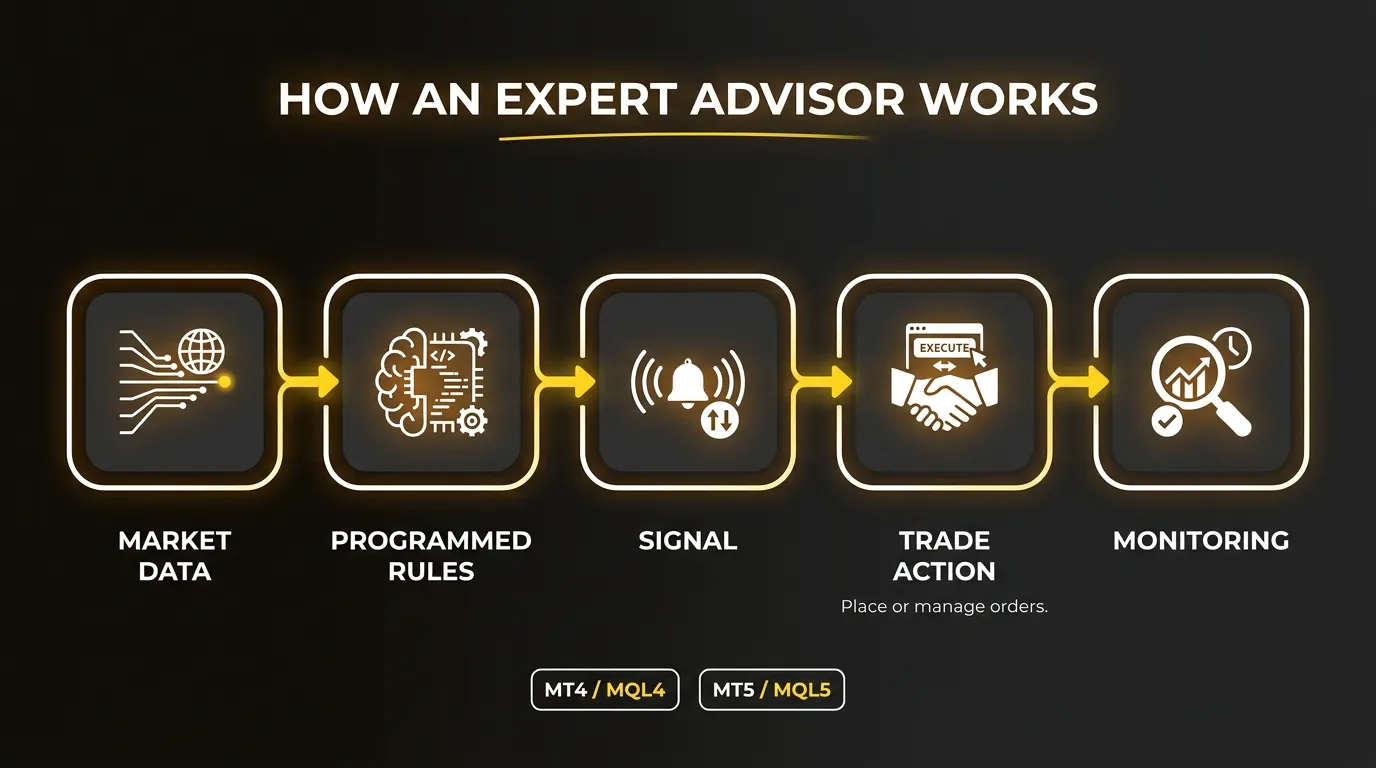
A basic workflow looks like this:
- Market data: the platform supplies prices and other data used by the EA.
- Programmed rules: the EA checks the data against its conditions and settings.
- Signal: the rules determine whether a defined setup is present.
- Trade action: if trading is permitted, the EA may place or manage an order.
- Monitoring: the program keeps evaluating new data and the state of relevant positions.
For example, an EA might be programmed to act only when EUR/USD reaches a specified price condition and a selected indicator confirms a second condition. It could then submit an order and apply predefined stop-loss and take-profit rules. This is an illustration of rule-based logic, not a trading strategy recommendation.
The program does not decide that a rule is sensible. It executes the logic it has been given. In MetaTrader, automated trading must also be allowed in the platform and in the individual EA settings before the program can perform trading operations. MetaQuotes documents these controls in its MetaTrader 5 guidance for Expert Advisors.
What Can an Expert Advisor Automate?
Depending on how it is written, configured, and permitted to operate, an EA may handle tasks such as:
- analysing defined price, indicator, or time conditions;
- generating alerts or trading signals;
- applying entry and exit rules;
- placing, modifying, or closing orders;
- setting or adjusting stop-loss and take-profit levels;
- applying trailing or other position-management logic; and
- monitoring selected instruments or open positions.
Not every EA performs every task. Some are analytical tools, some automate only part of a workflow, and others are designed to manage trades after a trader opens them manually.
What Changes Compared With Manual Trading?
In manual trading, the trader watches the market, interprets information, decides whether the setup meets the plan, and enters or manages the position. With an EA, some or all of those steps are translated into rules that software can evaluate repeatedly.
Automation can make rule execution more consistent, but it does not make the underlying rules accurate or suitable. Poor logic can be automated just as reliably as sound logic. An EA may also respond differently from what its user expects when data, spreads, execution conditions, platform permissions, connectivity, or market behaviour differ from the assumptions built into the program.
An automated system is therefore not necessarily “hands-off.” Someone still needs to choose and understand the strategy, configure its inputs, check whether it is operating correctly, and decide when its assumptions need to be reviewed.
EA Trading on MT4 and MT5
MetaTrader 4 and MetaTrader 5 both support automated-trading programs, but they use different development environments:
- MT4 uses MQL4. MetaQuotes describes MQL4 as the language used to develop Expert Advisors and indicators for MetaTrader 4 in its MT4 automated-trading overview.
- MT5 uses MQL5. Its EA environment, event model, platform functions, and testing capabilities are associated with MQL5.
An EA designed for MQL4 should not be assumed to run unchanged on MT5. MetaQuotes’ MQL4-to-MQL5 migration reference documents differences that developers need to consider when adapting programs. Compatibility depends on the source code, compiled format, functions, libraries, and other dependencies used by the EA. Migration may require code changes, recompilation, and fresh testing.
This is the automation-specific distinction that matters most for beginners: choose the platform first, then verify that the particular EA is designed and supported for that environment. General MT4-versus-MT5 features are a separate comparison question.
How EAs Are Tested
Backtesting runs an EA on historical market data to observe how its programmed rules would have behaved over a selected period. Both MetaTrader platforms provide Strategy Tester functionality. MetaQuotes explains that the MT4 Strategy Tester uses historical quote data for virtual transactions, while the MT5 Strategy Tester supports testing and optimization of Expert Advisors with configurable test conditions.
A useful test should reflect the intended instrument, timeframe, parameters, costs, and execution assumptions as closely as practical. Traders may also compare results across different periods and use forward testing or a demo environment to observe behaviour outside the original test sample.
Historical performance does not guarantee future results. A backtest may be affected by data quality, modelling choices, parameter fitting, simplified cost assumptions, and market conditions that do not repeat. Testing is evidence about how a program behaved under specified assumptions, not proof that it will remain profitable.
What to Check Before Using an EA
An EA should be evaluated as both a trading method and a piece of software.
| Check | Why it matters |
|---|---|
| Platform and language | Confirm whether the EA is built for MT4/MQL4, MT5/MQL5, or another system. |
| Strategy logic | Understand the conditions for entries, exits, position management, and risk controls. |
| Instrument and account compatibility | Confirm that the intended account and instruments support the EA’s requirements. |
| Trading conditions | Spreads, commissions, swaps, minimum trade sizes, and execution can change results. |
| Test evidence | Review the data period, assumptions, parameters, and whether results rely on heavy optimization. |
| Permissions and dependencies | Check automated-trading settings and any required external libraries or services. |
| Technical reliability | Consider internet connectivity, terminal availability, hosting, updates, and error handling. |
| Monitoring plan | Decide how failures, unusual activity, strategy drift, and changed market conditions will be detected. |
Source and security also matter. An EA from an unknown provider may contain opaque logic or request access to external components. MetaQuotes specifically advises caution when allowing external DLL imports in its platform guidance. Users should understand what a program is permitted to do before running it on an account.
Can You Use Automated Trading With a CFD Broker?
Yes, automated trading can be used with a CFD broker when the broker offers a compatible platform and the selected account, instruments, and trading conditions support the EA’s requirements. Compatibility must be checked for the specific setup; access to MT4 or MT5 alone does not establish that every EA will work with every account or CFD instrument.
The program also needs the required platform permissions and a suitable technical environment. If it depends on continuous operation, closing the terminal, losing connectivity, or interrupting its hosting can stop or alter its workflow. Some strategies may also depend on particular symbols, price formats, order types, or execution assumptions.
What to Look for in a Broker for EA Trading
There is no single best broker for every Expert Advisor or algorithmic-trading strategy. A useful evaluation starts with the EA’s actual requirements and then compares the environment available to it.
Key points include:
- access to the required MT4, MT5, or other trading platform;
- support for the EA’s platform version, account type, and intended instruments;
- current spreads, commissions, swaps, and other relevant trading costs;
- execution rules and order types required by the strategy;
- reliable access to the platform and trading server;
- VPS or hosting options if continuous terminal operation is needed;
- any restrictions that affect the program’s trading style; and
- tools for testing, logs, monitoring, and intervention.
These criteria also apply when comparing brokers for algorithmic trading more broadly. The meaningful question is not which broker has the strongest automation slogan, but whether the platform, trading conditions, technical setup, and account rules fit the specific system being evaluated.
Explore MT4 and MT5 at Grand Markets
After understanding the platform requirements of an EA, readers can review Grand Markets’ current MetaTrader 4 desktop information and MetaTrader 5 desktop information. Before using an automated strategy, confirm the EA’s platform, account, instrument, and technical requirements against the current conditions shown for the intended setup.
Frequently Asked Questions
What Is an Expert Advisor in Forex Trading?
An Expert Advisor is a program commonly used with MetaTrader to analyse market data and apply predefined trading rules. A Forex EA may generate signals, manage positions, or place trades automatically when its design, settings, and platform permissions allow it.
How Does an Expert Advisor Work?
An EA reads data from the trading platform, checks that data against programmed conditions, and produces a defined response. The response may be an alert, an order, or a trade-management action. It then continues monitoring new data according to its rules.
Is an EA the Same as a Trading Bot?
They can refer to similar tools, but they are not exact synonyms. “Expert Advisor” usually refers to a program in the MetaTrader ecosystem. “Trading bot” is an informal term that can describe automated software used on many different platforms.
Can Expert Advisors Trade Automatically?
Yes. An EA can place or manage trades automatically if it includes that functionality and automated trading is enabled in the platform and the EA’s settings. Some EAs only analyse markets or issue alerts, so their level of automation varies.
Can You Use Automated Trading With a CFD Broker?
Yes, if the broker’s platform, account, instruments, and trading conditions are compatible with the automated system. Traders should verify the requirements of the particular EA rather than assume that every program works across all CFD brokers or accounts.
Do Expert Advisors Work on Both MT4 and MT5?
Both platforms support Expert Advisors, but MT4 uses MQL4 and MT5 uses MQL5. An EA created for one environment should not be assumed to work unchanged in the other. Adaptation, recompilation, and new testing may be required.
Do Expert Advisors Need to Be Monitored?
Yes. Monitoring helps identify connection failures, platform or permission changes, unexpected orders, technical errors, and performance that no longer matches the program’s assumptions. Automation executes rules; it does not remove the need for oversight.
Is Automated Trading the Same as Algorithmic Trading?
The terms overlap, but algorithmic trading is broader. It covers trading decisions and actions driven by formal algorithms, while automated trading emphasizes that some or all of the workflow is performed automatically. An EA can be both algorithmic and automated.
Automated trading does not remove market risk. Before using an EA, understand its logic, test its assumptions, verify its compatibility, and monitor how it behaves under current trading conditions.

Disclaimer:
This content does not constitute any offer, solicitation or advice. You should always seek independent professional advice before making any investment decision. Please note that Grand Markets may restrict or prohibit some or all services to users from restricted regions. Please read the User Agreement for more information.