
Brokers worth comparing for algorithmic trading include Pepperstone, Exness, RoboForex, AvaTrade, Capital.com, eToro and Grand Markets. Their distinct routes include multi-platform automation, hosted VPS access, cent-based testing, documented MetaTrader workflows, MetaTrader automation alongside broader platform ecosystems, and public-API automation. No single option is best for every strategy.
There is no single best broker for every algorithm. An existing MT4 Expert Advisor, a new MT5 strategy, a C# bot and an API-based system require different software, hosting and account conditions. The useful question is which broker provides a compatible route with costs and operating conditions that suit the strategy.
How We Compared Algorithmic-Trading Brokers
This shortlist was built from current official broker information. We compared platform and EA compatibility, automation routes, VPS or hosting options, account and instrument access, cost visibility, testing and monitoring, and any important eligibility conditions. We did not rank brokers by promotional execution claims or assume that an EA will produce the same result across different environments.
Every included broker has a distinct reason to be here. Current conditions can vary by legal entity, country, account, instrument and platform, so confirm the applicable terms before opening or moving an automated strategy.
Best Brokers for Algorithmic Trading and Expert Advisors at a Glance
| Broker | Platforms or automation route | Standout use case | Hosting or continuity | Important check |
|---|---|---|---|---|
| AvaTrade | MT4 and MT5 Expert Advisors | A documented MetaTrader EA workflow | Supports connection to an external VPS | Confirm the selected account, instruments and third-party VPS terms |
| Capital.com | MT4/MT5 automated strategies and EAs; proprietary web/mobile platforms and TradingView also available | MetaTrader automation alongside a broader platform ecosystem | No broker-hosted VPS claim is made here | Confirm regional, entity, account and platform availability |
| eToro | Public API for programmatic orders and data | API-based automation rather than an EA-installation workflow | The user is responsible for the application and its continuity | Confirm API eligibility, permissions, limits and supported operations |
| Exness | MT4 and MT5, including Expert Advisors | MetaTrader automation with an application-based broker VPS route | Exness VPS is available subject to current eligibility | Check VPS eligibility and any strategy or account restrictions |
| Grand Markets | MT4 Expert Advisors and MT5 algorithmic-trading tools | Existing Grand Markets users comparing its two MetaTrader routes | No Grand Markets VPS claim is made here | Confirm account, instrument, platform and current cost compatibility |
| Pepperstone | MT4/MT5 EAs and cTrader cBots | Traders comparing multiple automation platforms and languages | Sponsored VPS plans have trading-volume criteria | Check code compatibility and current VPS qualification rules |
| RoboForex | MT4/MT5 EAs, including a ProCent testing route | Traders specifically seeking cent-based EA experimentation | VPS access has current balance, activity or fee conditions | Translate cent-lot volume into real exposure and verify VPS terms |
This is a use-case comparison, not a performance ranking. An automated strategy can lose money, and platform support does not validate the strategy itself.
AvaTrade: A Closely Documented MetaTrader EA Route
AvaTrade explains how Expert Advisors work on MetaTrader, how to add an EA, and how MT4 and MT5 support automation. Its algorithmic-trading platform page also describes MT4/MT5 automation and connecting through an external VPS.
This route may suit users who want a conventional MetaTrader setup with accessible implementation guidance. The main limitation is that the VPS is an external service rather than an unconditional broker-hosted benefit. Confirm the relevant account, platform, instruments and VPS provider terms before deployment.
Capital.com: Proprietary Platforms Alongside MetaTrader Automation
Capital.com’s current platform overview presents its proprietary web and mobile platforms alongside MT4, MT5 and TradingView. Its current MetaTrader information describes automated strategies, Expert Advisors and strategy-testing functionality.
This combination may suit users who want to compare a broker’s proprietary environment with MetaTrader automation under the same provider. Platform, account and instrument availability can vary by region and legal entity, so verify the precise MT4 or MT5 route, applicable costs and supported markets before deploying a strategy.
eToro: An API-Based Alternative to MetaTrader EAs
eToro is on our list for a genuinely different form of algorithmic trading. Its current Public API documentation describes building algorithmic trading bots, retrieving market data and managing orders programmatically. Access requires a verified account, and API keys can carry different permissions.
This may suit developers who want to build an API-connected application rather than install an EA in a MetaTrader terminal. It is not a direct substitute for an existing MQL4 or MQL5 EA. Review the current authentication, environment, rate-limit and order rules before treating the API as compatible with a strategy.
Exness: A Broker-Hosted VPS Path for Eligible Users
Exness supports MetaTrader automation and publishes a dedicated VPS service intended to keep Expert Advisors running without relying on a personal computer or home connection. That makes it a distinct option for MT4 or MT5 users who want a broker-hosted continuity route.
The VPS should not be treated as unconditional. Exness directs users to current application and eligibility criteria, which can change. Verify qualification, the selected MetaTrader account and any restrictions that affect the strategy before relying on the service.
Grand Markets: MT4 and MT5 Automation With Live Account and Cost Routes
Grand Markets provides two relevant desktop paths. Its MetaTrader 4 page describes Expert Advisors and automated trading, while its MetaTrader 5 page covers algorithmic trading and MetaEditor for trading robots and indicators.
Grand Markets may therefore be considered by users comparing MT4 and MT5 within its current account range. Review the live Trading Accounts and Fees, Spreads and Commissions pages alongside the platform information. The published pages do not establish that every account and instrument supports every automated workflow, and no Grand Markets VPS offering is assumed here.
Pepperstone: The Broadest Platform Mix in This Shortlist
Pepperstone stands out for offering more than one automation environment. Its current algorithmic-trading material supports Expert Advisors on MT4 and MT5 and cBots on cTrader. The cTrader Automate page documents a C#-based route for building, backtesting and optimising trading robots.
That breadth may suit traders comparing MetaTrader with cTrader rather than selecting a broker around one existing codebase. The technologies are not interchangeable: MQL4, MQL5 and C# strategies require the appropriate platform and may need redevelopment when moving. Pepperstone also offers sponsored VPS plans subject to current trading-volume criteria.
RoboForex: A Cent-Based Environment for EA Experimentation
RoboForex earns a place because its official ProCent material explicitly positions the account for testing strategies, Expert Advisors and algorithmic trading on MT4 or MT5. A cent-denominated balance can support smaller-scale live-market experimentation when the selected volume and contract specifications create the intended exposure.
This is not the same as proving an EA is reliable. Users must translate cent lots into actual market exposure and compare the account’s spread, execution and instrument conditions. RoboForex also offers a VPS service with current eligibility or fee conditions, so check the live terms rather than assuming it is free for every account.
What an Automated-Trading Broker Setup Needs
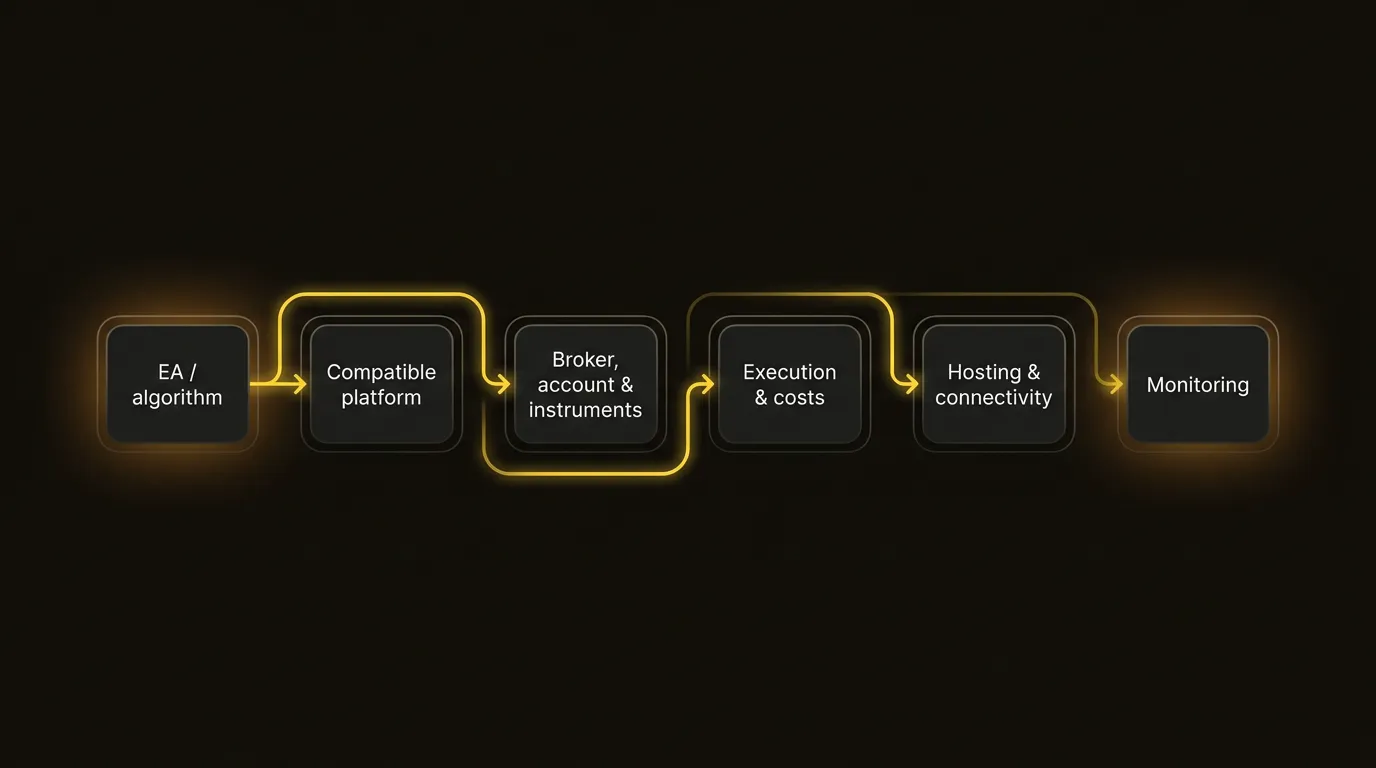
An automated strategy is a chain, not a single broker feature. The algorithm must match the platform; the platform must connect to a suitable account and instruments; trading costs and order handling must fit the strategy; and the setup needs reliable connectivity and ongoing monitoring.
EA and Platform Compatibility
An Expert Advisor is a program that analyses conditions and can place or manage orders according to predefined rules in a compatible MetaTrader terminal. MT4 EAs normally use MQL4, while MT5 EAs use MQL5. A file created for one environment should not be assumed to work in another, and a cTrader cBot or API application is a different implementation again.
Start with the strategy you already have, or the language and tools you intend to use. Then choose the broker route. A long platform list is not useful if it does not support the exact automation method, account and instruments required.
Trading Costs and Strategy Frequency
Costs can have an outsized effect on systems that trade frequently or target small price movements. Compare the spread and any commission for the same instrument, account type and approximate trading pattern. Include overnight financing when positions can remain open, plus conversion or other applicable charges.
Do not compare a spread-only account with a commission-based account using one headline number. Use the broker’s current specifications and model the all-in cost over a representative set of trades. Platform choice does not determine broker pricing: MT4 or MT5 access can sit alongside different account cost structures.
Execution Assumptions
An algorithm may depend on how quickly orders reach the broker, how prices change between signal and execution, which order types are supported, and what happens during volatile or illiquid periods. Backtests often simplify these conditions.
Avoid choosing from incomparable “fastest execution” claims. Test the intended strategy in the available environment, use realistic spread and slippage assumptions, and monitor rejected orders, partial fills, connection events and differences between expected and actual execution.
VPS and Continuous Operation
A VPS can keep a desktop terminal and its EAs running when a personal computer is off or the local connection fails. It can be useful for strategies that need continuous operation, but it is not required for every automated workflow. Some API systems use different cloud infrastructure, while infrequent or closely supervised strategies may not need round-the-clock hosting.
Check whether the broker provides or sponsors a VPS, which platforms it supports, where it is hosted, and whether equity, trading volume, activity or monthly fees apply. “VPS available” is incomplete without those conditions.
Account, Instrument and Strategy Compatibility
Broker-level support for automation does not prove that every account or instrument is suitable. Verify the symbols available on the intended platform, contract specifications, minimum volume, trading sessions, order types and pricing model. A strategy designed for one symbol naming convention or contract size may require configuration changes elsewhere.
Read the current agreement and automation rules as well. Brokers may restrict abusive order traffic, unsupported API use or other activity even when normal EAs and algorithms are allowed.
Testing and Monitoring
Backtesting can reveal how code behaves on historical data, but results depend on data quality, modelling choices and assumptions about spread, commission and execution. Forward testing in a demo environment can help identify technical faults, although it does not fully reproduce live liquidity or trading conditions.
Live automation still needs supervision. Monitor connectivity, errors, order responses, exposure, drawdown and whether the strategy is operating within its intended parameters. Neither a broker, platform nor VPS removes the need for risk controls.
A Practical Shortlist Process
- Identify the exact automation route: MQL4 EA, MQL5 EA, cTrader cBot, API or another supported method.
- Eliminate brokers that do not support that route on the required account and instruments.
- Compare all-in costs using the strategy’s likely frequency and holding time.
- Check order types, contract specifications and realistic execution assumptions.
- Decide whether local operation, an external VPS, a broker-sponsored VPS or API hosting is appropriate.
- Backtest, forward test and define monitoring and failure procedures before live use.
- Recheck the legal entity, regional availability and current terms shown during registration.
The best broker for algorithmic trading is the one that survives this process for the specific strategy, and not the one with the longest feature list.
Frequently Asked Questions
Which Brokers Are Best for Algorithmic Trading?
Pepperstone is a strong option for comparing MT4, MT5 and cTrader automation; eToro provides a distinct Public API route; Exness offers an eligibility-based hosted VPS path; RoboForex provides a cent-based EA testing environment; AvaTrade documents MetaTrader EAs closely; Capital.com combines proprietary platforms with MetaTrader automation; and Grand Markets provides MT4/MT5 routes with live account and cost pages. The best fit depends on the strategy.
Which Brokers Are Best for EA Trading?
For traditional MetaTrader Expert Advisors, compare Pepperstone, Exness, RoboForex, AvaTrade, Capital.com and Grand Markets. Choose according to whether the EA requires MT4 or MT5, the account and instruments it trades, total costs, hosting needs and current restrictions. eToro belongs to the wider algorithmic comparison through its API, not as the same kind of EA-installation route.
What Should I Look for in a Broker for Expert Advisors?
Check exact EA and platform compatibility, account and instrument access, spread and commission structure, order types, execution behaviour, VPS conditions if continuous operation is needed, strategy restrictions, and the tools available for testing and monitoring.
Can You Use Expert Advisors With Any Broker?
No. The broker must support the relevant MetaTrader environment and allow the intended automated activity on the selected account and instruments. Even when EAs are supported generally, platform versions, symbols, contract specifications or account rules can make an existing EA incompatible without adjustment.
Is MT4 or MT5 Better for EA Trading?
Neither is universally better. MT4 is the natural choice for an existing MQL4 EA, while MT5 supports MQL5 and a different testing and platform environment. Choose based on the EA’s codebase, required instruments and broker account, not on the platform version number alone.
Do You Need a VPS for EA Trading?
Not always. A VPS is useful when a desktop terminal must remain connected while the local computer is off or unreliable. It may be unnecessary for strategies that do not require continuous operation or for API systems hosted another way. Check the VPS platform, location, eligibility and cost before relying on it.
Can Automated Trading Be Used With CFD Brokers?
Yes, when the CFD broker supports a compatible automation route, such as MetaTrader EAs, cTrader cBots or an approved API, for the relevant account and instruments. Platform support does not guarantee strategy performance, so test the setup and verify current broker rules and costs.
Automated trading and CFDs involve significant risk. Algorithms can amplify coding errors, connectivity failures and losses as well as execute a plan consistently. This article is a comparison of current automation routes, not personal financial advice or a promise of performance.

Disclaimer:
This content does not constitute any offer, solicitation or advice. You should always seek independent professional advice before making any investment decision. Please note that Grand Markets may restrict or prohibit some or all services to users from restricted regions. Please read the User Agreement for more information.