
Forex order types define when a trade instruction can execute, which price condition must be met, and how much control the trader has over the eventual fill. A market order seeks immediate execution. A limit order accepts only the stated price or better. A stop order activates after a trigger price is reached. A pending order waits until its conditions are met.
In practical terms, the four standard pending forex orders are Buy Limit, Sell Limit, Buy Stop, and Sell Stop. MetaTrader 5 also supports Buy Stop Limit and Sell Stop Limit; MetaTrader 4 does not offer those two stop-limit entries as native order types.
All prices in this guide are hypothetical examples for education only. They are not trading recommendations.
What are the main forex order types?
An order is an instruction sent through a trading platform to open, close, or manage a position. It can request execution now or only after a future price condition is met.
| Order type | What it does | Main trade-off |
|---|---|---|
| Market order | Seeks to buy or sell immediately at the best available price | Execution is prioritized, but the displayed price is not guaranteed |
| Limit order | Seeks a specified price or better | Controls the worst acceptable price, but may not fill |
| Stop order | Activates after a specified trigger is reached | Can enter or exit after a price move, but may slip |
| Stop-limit order | Activates a limit order after a stop trigger | Adds price control after activation, but may remain unfilled |
| Stop-loss / take-profit | Closes an existing position when a defined condition is met | Helps automate exits, but standard stops are not guaranteed prices |
Market order
A market order instructs the platform to buy or sell immediately at the best available executable price. It prioritizes speed of execution rather than a specific fill price.
For example, EUR/USD is quoted at:
| Quote side | Price |
|---|---|
| Bid | 1.1000 |
| Ask | 1.1002 |
A market buy generally opens at or near the Ask, around 1.1002. A market sell generally opens at or near the Bid, around 1.1000.
The final fill can differ from the displayed price because quotes and available liquidity can change before execution. That difference is slippage, and it can be positive or negative.
Limit order
A limit order sets the least favorable price accepted for execution.
- A buy limit seeks to buy at the selected price or lower.
- A sell limit seeks to sell at the selected price or higher.
A limit order provides price control, but it does not guarantee a fill. For example, if EUR/USD is quoted at 1.1000 / 1.1002, a Buy Limit at 1.0980 can execute only when the relevant Ask reaches 1.0980 or lower and the order can be matched.
The official MetaTrader 4 order-type reference defines Buy Limit and Sell Limit by their relevant Ask and Bid conditions. Price can approach a limit without filling it if the correct quote side never meets the condition or liquidity is unavailable.
Stop order
A stop order becomes active when the relevant quote reaches a specified trigger level. A standard stop entry generally submits a market-execution request after it triggers.
- A Buy Stop is placed above the current Ask.
- A Sell Stop is placed below the current Bid.
For example, a Buy Stop at 1.1030 can trigger when the Ask reaches 1.1030. During a fast upward move, the eventual fill could be above 1.1030. The stop price is a trigger, not a guaranteed execution price.
The CFTC glossary definition of a stop order explains that it becomes a market order when the specified price is reached.
Stop-limit order
A stop-limit order combines two price instructions:
- A stop price that activates the order.
- A limit price that controls the worst acceptable fill after activation.
For example:
| Setting | Price |
|---|---|
| Buy Stop Limit trigger | 1.1030 |
| Buy Limit placed after the trigger | 1.1035 |
If the Ask reaches 1.1030, a buy limit at 1.1035 is placed. If executable prices then move above 1.1035 before the limit order can fill, the order can remain unfilled.
This order type can limit the price accepted after activation, but that control comes at the cost of execution certainty. On MetaTrader, native Buy Stop Limit and Sell Stop Limit orders are available in MT5, not MT4. Availability and permitted settings can also depend on the symbol and broker server.
Stop-loss, take-profit, and trailing stop
A stop-loss is intended to close a position after an adverse move. It is normally below a long position or above a short one. A take-profit closes after a favorable target: normally above a long position or below a short one.
These controls work best within a broader position sizing and risk management process, but they do not guarantee a particular execution price.
A trailing stop adjusts the stop-loss as price moves favorably. In MT4 and MT5, the trailing algorithm runs in the terminal rather than on the broker server. If the terminal disconnects, the last stop-loss sent to the server remains but stops trailing until the terminal resumes. See the official MetaTrader 5 trade-management documentation.
Buy Limit vs Buy Stop vs Sell Limit vs Sell Stop
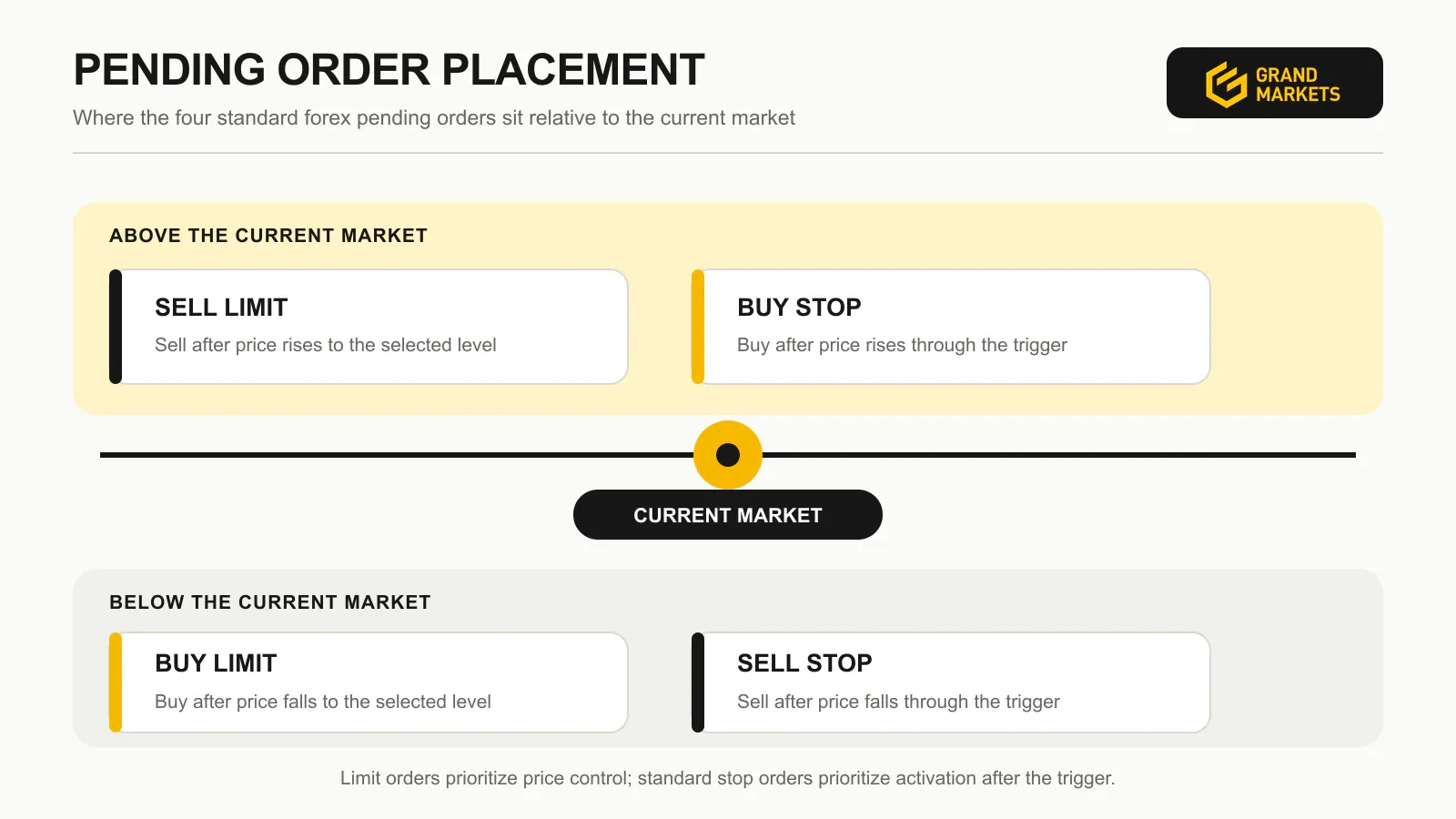
The four standard pending forex orders are placed above or below the current market according to the direction and price condition.
| Trader action | Below current market | Above current market |
|---|---|---|
| Buy | Buy Limit | Buy Stop |
| Sell | Sell Stop | Sell Limit |
Buy Limit
A Buy Limit is a pending instruction to buy below the current Ask. It waits for the market to decline to the selected entry price.
| Item | Example |
|---|---|
| Current EUR/USD quote | 1.1000 / 1.1002 |
| Buy Limit price | 1.0980 |
| Trigger side | Ask |
| Expected behavior | Buy at 1.0980 or lower if executable |
The order can remain pending if the Ask never reaches 1.0980. It controls entry price, not future market direction.
Sell Limit
A Sell Limit is a pending instruction to sell above the current Bid. It waits for the market to rise to the selected entry price.
| Item | Example |
|---|---|
| Current EUR/USD quote | 1.1000 / 1.1002 |
| Sell Limit price | 1.1020 |
| Trigger side | Bid |
| Expected behavior | Sell at 1.1020 or higher if executable |
The order can remain unfilled if the Bid does not reach 1.1020 or no executable liquidity is available at the limit.
Buy Stop
A Buy Stop is a pending instruction to buy above the current Ask. It activates only after the market rises to the selected trigger.
| Item | Example |
|---|---|
| Current EUR/USD quote | 1.1000 / 1.1002 |
| Buy Stop price | 1.1030 |
| Trigger side | Ask |
| Expected behavior | Seeks market execution after Ask reaches 1.1030 |
After triggering, the final fill depends on available prices.
Sell Stop
A Sell Stop is a pending instruction to sell below the current Bid. It activates only after the market falls to the selected trigger.
| Item | Example |
|---|---|
| Current EUR/USD quote | 1.1000 / 1.1002 |
| Sell Stop price | 1.0970 |
| Trigger side | Bid |
| Expected behavior | Seeks market execution after Bid reaches 1.0970 |
During a rapid decline or gap, the final fill can be below the trigger price.
MT4 vs MT5: which pending orders are available?
MetaTrader 4 provides four native pending-entry types. MetaTrader 5 adds two stop-limit variants. This is an important difference between MT4 and MT5: a reference to a Buy Stop Limit or Sell Stop Limit should not be treated as an MT4 instruction.
| Pending order | MT4 | MT5 | Basic placement |
|---|---|---|---|
| Buy Limit | Yes | Yes | Below the current Ask |
| Sell Limit | Yes | Yes | Above the current Bid |
| Buy Stop | Yes | Yes | Above the current Ask |
| Sell Stop | Yes | Yes | Below the current Bid |
| Buy Stop Limit | No | Yes | Stop trigger above market; Buy Limit placed after activation |
| Sell Stop Limit | No | Yes | Stop trigger below market; Sell Limit placed after activation |
MetaQuotes lists four pending order types in MT4 and six in MT5. Minimum distance, expiration, and filling rules can vary by symbol and server.
Grand Markets provides access to both the MT4 desktop platform and MT5 desktop platform. Check the order ticket and current symbol specification before assuming every field is available for every instrument.
Order vs deal vs position: what is the difference?
These terms describe different stages of a transaction. An order is the instruction submitted to the broker, such as a market buy or a pending Sell Stop. A deal is the execution record produced when all or part of an order is filled. One order can produce more than one deal if it is filled in parts. A position is the resulting market exposure held in the account after execution.
For example, placing a Buy Limit creates an order. If it fills, the execution is a deal and the account gains or changes a long position. Canceling it creates no deal or position. MT5 separates Orders, Deals, and Positions in its history and account model, explaining why an accepted order may not yet create exposure.
How Bid and Ask affect forex order triggers
Forex quotes normally include two prices:
| Quote component | General function |
|---|---|
| Bid | Price generally available to sell |
| Ask | Price generally available to buy |
| Spread | Difference between Ask and Bid |
A buy generally opens at Ask and a long closes at Bid. A sell generally opens at Bid and a short closes at Ask. The spread can therefore make a new position show an immediate unrealized loss.
For standard MetaTrader forex triggers:
- Buy Limit and Buy Stop orders are checked against the Ask.
- Sell Limit and Sell Stop orders are checked against the Bid.
- Stop-loss and take-profit on a long position are generally checked against the Bid.
- Stop-loss and take-profit on a short position are generally checked against the Ask.
MT4 charts commonly show Bid. A buy-side order can trigger because Ask reached the level even when a Bid-only chart appears not to touch it. Enabling the Ask line helps. Some MT5 exchange instruments can use other price fields such as Last, so check the symbol specification.
How slippage and gaps affect forex order execution
Slippage is the difference between the expected price and actual fill. It can occur when prices move, liquidity is limited, spreads widen, or the market jumps between available quotes.
A market order and a standard stop order can receive positive or negative slippage. A limit order should not execute at a worse price than its limit, but it can remain unfilled. Partial fills and execution policies can also affect the result, depending on the instrument, platform, and broker configuration.
A gap occurs when the next available price is separated from the previous quote, with no executable prices in between.
| Order type | Possible outcome during a gap |
|---|---|
| Market order | Fills at the next available executable price |
| Standard stop entry | Triggers and can fill beyond the stop level |
| Standard stop-loss | Can close at a worse price than the selected stop |
| Limit order | Fills only at the limit price or better, or remains unfilled |
| Stop-limit order | Activates its limit order, which can remain unfilled |
The CFTC notes that contingent instructions, including stop-loss and stop-limit orders, may not restrict losses to the intended amount when market conditions prevent execution at the selected level. See its guidance on contingent-order risks.
Spreads can also widen during lower-liquidity periods, rollover, market resumptions, and high-impact economic events. The Grand Markets account conditions page explains that spreads are floating and may widen. Check the live Bid, Ask, spread, and order status rather than relying only on the last chart price.
Pending-order expiry and order status
A pending order is not an open trade. It remains an instruction until it fills, expires, is rejected, or is canceled.
Common time settings include:
- Good Till Cancelled (GTC): Remains active until it fills or is canceled, subject to broker, symbol, and server rules.
- Specified time / Good Till Date: Expires at the selected date and time where supported.
- Today / specified day: Expires at the end of the relevant trading day where the MT5 server and symbol permit that setting.
MT4 can provide an Expiry field, but a broker may restrict it. MT5 documents GTC, Today, Specified, and Specified Day modes, subject to server configuration. Do not assume identical cutoffs across brokers or time zones.
After submission, verify whether the instruction is pending, filled, partially filled, rejected, expired, or canceled. Review active orders before weekends, major economic releases, or any change to the reason for placing them. An old pending order can still activate later if it remains valid.
How to place a forex order step by step
The exact buttons differ between MT4, MT5, web, and mobile platforms, but the verification process is broadly similar.
If you are still setting up the platform or learning the basic ticket workflow, see our getting-started guides for MT4 and MT5.
- Select the instrument. Confirm the exact symbol and whether it is currently tradable.
- Check the Bid, Ask, and spread. Use the relevant quote side for the intended direction.
- Choose Buy or Sell. Direction defines the transaction, not the outcome.
- Choose immediate or conditional execution. Select Market for an immediate instruction or Pending Order for a future condition.
- Select the pending-order type. Use Buy Limit, Sell Limit, Buy Stop, or Sell Stop according to the placement matrix. Use stop-limit only where the platform supports it.
- Enter the volume. Confirm the contract size and margin effect before submission.
- Set the entry or trigger price. Check that the price is above or below the market as required and meets any minimum-distance rule.
- Add stop-loss and take-profit levels if appropriate. Treat standard stops as execution instructions, not guaranteed prices.
- Choose an expiry where needed. Avoid leaving a time-sensitive order active indefinitely.
- Review all fields. Confirm symbol, direction, order type, volume, prices, and expiry.
- Submit and check the status. An accepted order may be pending rather than filled.
- Monitor or cancel the instruction. Update it if its original conditions no longer apply.
Practice placement, modification, and cancellation on a demo account first. Demo conditions may not reproduce live liquidity, spreads, or slippage.
Common forex order-type mistakes
| Mistake | What to check instead |
|---|---|
| Placing a Buy Limit above the market | A buy entry above the current Ask is normally a Buy Stop |
| Placing a Sell Limit below the market | A sell entry below the current Bid is normally a Sell Stop |
| Treating a stop price as a guaranteed fill | Allow for slippage and price gaps |
| Ignoring Bid and Ask | Check the quote side that activates the order |
| Assuming a chart touch guarantees a fill | Confirm the correct quote side and executable liquidity |
| Leaving GTC orders unreviewed | Check active pending orders on a schedule |
| Treating stop-limit as guaranteed protection | The activated limit order can remain unfilled |
| Looking for Buy Stop Limit in MT4 | Native stop-limit pending orders are an MT5 feature |
| Assuming every server has identical settings | Verify expiry, minimum distance, and filling rules for the symbol |
| Failing to check the final status | Confirm whether the order is pending, filled, rejected, expired, or canceled |
Frequently asked questions
What is a pending order in forex?
A pending order is an instruction to buy or sell only after a future price condition is met. The four standard types are Buy Limit, Sell Limit, Buy Stop, and Sell Stop. Until the order fills, it is not an open position.
What is the difference between a market order and a limit order?
A market order seeks immediate execution at the best available price. A limit order executes only at its selected price or better. Market orders prioritize execution; limit orders prioritize price control and may not fill.
What is the difference between a limit order and a stop order?
A limit entry is placed at a more favorable price than the current market. A stop entry is placed beyond the current market and activates after price reaches its trigger. A limit can remain unfilled; a triggered standard stop can fill away from its trigger.
What is the difference between Buy Limit and Buy Stop?
A Buy Limit is placed below the current Ask and waits for price to fall. A Buy Stop is placed above the current Ask and waits for price to rise. Both are pending buy orders, but their placement and trigger conditions are different.
Does MT4 have stop-limit orders?
No. MT4 natively supports Buy Limit, Sell Limit, Buy Stop, and Sell Stop. MT5 adds Buy Stop Limit and Sell Stop Limit. Custom software may simulate other behavior, but that is not the same as a native MT4 order type.
Are stop-loss orders guaranteed?
A standard stop-loss is not a guaranteed fill price. It can execute beyond the selected level during volatility, reduced liquidity, or a gap. Any guaranteed-stop feature is broker-specific and applies only under its published conditions.
Practice Forex Order Types With Grand Markets
At Grand Markets, you can use our MT4 and MT5 platforms to practise order placement before moving to live conditions. A demo account can help you learn where market, limit, and stop instructions appear, how to modify a pending order, and how Bid and Ask prices affect triggers. Demo execution may not reproduce live spreads, liquidity, or slippage. Before placing a live order, check the current account terms, instrument specification, minimum-distance rules, and available order fields for the relevant symbol. You can also review our trading application downloads to choose the platform that fits your workflow.
Risk notice: Forex and CFDs are leveraged products. Market, stop, and stop-loss orders may execute away from the expected price, while pending orders do not guarantee execution. Leverage can magnify losses. The examples in this guide are educational and are not personalized investment advice.

Disclaimer:
This content does not constitute any offer, solicitation or advice. You should always seek independent professional advice before making any investment decision. Please note that Grand Markets may restrict or prohibit some or all services to users from restricted regions. Please read the User Agreement for more information.